FileGenius automatically sorts your messy Downloads, Desktop, and Documents into neat folders — so you can focus on creating, not cleaning.
Version 1.0 · Windows 10 / 11 · No installation required
move your cursor — watch the clutter sort itself
▶ Live Demo
✦ See It In Action
Dead simple interface — choose a folder, click Organize, watch the magic happen.
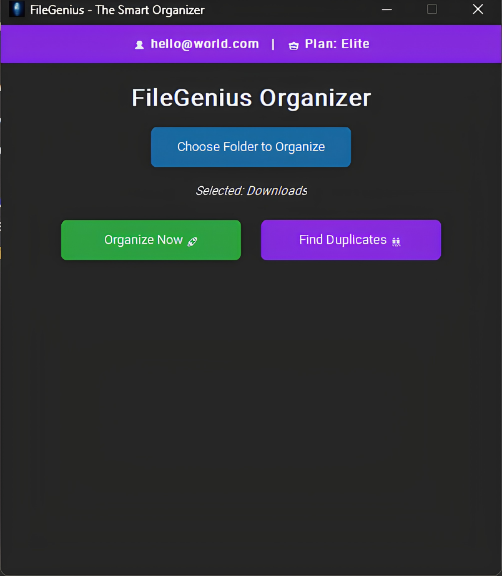
Stop wasting hours manually sorting files. Let the genius do it.
Organizes thousands of files in mere seconds, running seamlessly in the background.
Not only moves your files — automatically detects and removes leftover empty folders too.
Log in securely to access your Free or Pro tier features from any Windows computer.
Scans for identical files cluttering your drive and lets you remove them in one go.
Pro unlocks organizing any folder on your system — Desktop, Documents, custom paths.
A native-feeling Windows app with a dark interface that doesn't strain your eyes.
Start free. Upgrade when you need more. No hidden fees.
✦ Safe & Verified
Independently verified by Microsoft and leading antivirus providers.
Submitted to and reviewed by Microsoft Security Intelligence. No malware detected on both Cloud & Client scans.
✅ No Malware DetectedScanned against 70 top antivirus engines. 69 returned completely clean. The 1 flag is a known PyInstaller false positives — not real threats.
✅ 69 / 70 CleanFileGenius only reads your local file extensions to categorize them. No personal files are ever read, uploaded, or shared.
✅ Privacy FirstIf Windows shows a SmartScreen popup, click "More info" → "Run anyway". This appears for indie apps without a paid certificate.
✅ Safe to RunFileGenius is built by a solo Filipino developer using PyInstaller — a common Python packaging tool that some antivirus engines flag by default. 69 out of 70 engines confirm it is completely safe. Questions? Contact us anytime.
Questions, feature requests, or just want to say hi?
Have a question or feature request? Send us a message and we'll get back to you within 24 hours.